How to Rank on Google and Get Cited by AI Search Engines
AI SEO is technical SEO — plus a few extra steps most people miss. The exact mistakes to avoid and the checklist I run on every site I work on.
 Aryan Rawther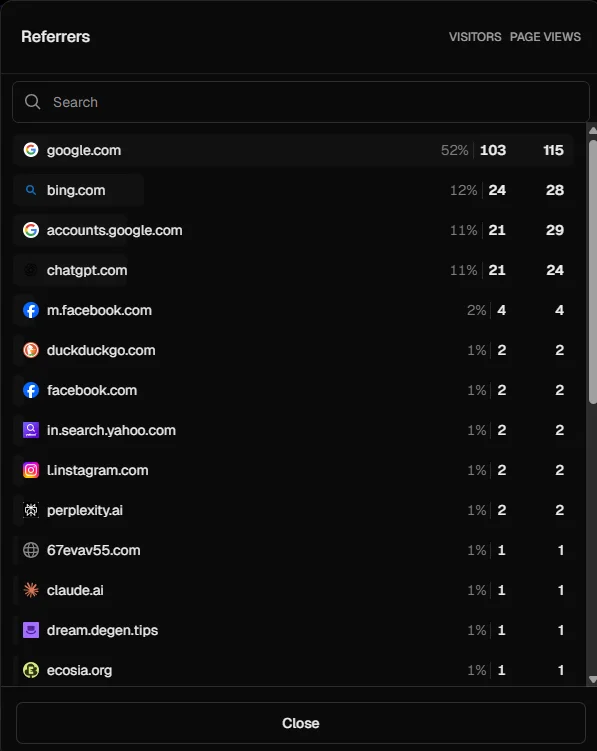
If you have a website and you are not getting the traffic you want — whether you are a founder, a freelancer, running an agency, or just someone who built something and wants people to actually find it — this guide is for you. AI search engines like ChatGPT and Perplexity are changing how people discover websites, and most people have not adapted yet. Here is the exact technical setup I run on every site I work on as part of my SEO services.
What This Guide Actually Gives You
You could prompt ChatGPT for a generic SEO checklist — but it will not tell you which items actually move the needle versus which ones are busywork. That is what experience gives you, and that is what this guide is built on.
I am going to show you the specific mistakes I keep seeing, the technical setup that actually works, and the results I have gotten from running this exact playbook. Where it helps, I will also give you the sauce so that you can ask the right questions to ask an LLMLarge Language Model — the AI behind tools like ChatGPT, Claude, and Perplexity that can understand and generate text. so you can go deeper on your own.
TL;DR — Quick Checklist
- Allow AI crawlers (GPTBot, ClaudeBot, PerplexityBot) in your
robots.txt - Create
/llms.txtand/llms-full.txtfiles on your site - Submit your sitemap to both Google Search Console and Bing Webmaster Tools
- Add unique meta tags and Open Graph tags to every page
- Add schema markup (JSON-LD) to every page
- Compress images, use WebP, set width/height on all images
- Test your site on pagespeed.web.dev — aim for 90+
- Build internal links between all your pages
- Build quality backlinks — avoid spammy ones
- Deploy your website as early as possible — do not wait for your product to be ready
If you want the why and the how behind each of these, keep reading.
Prerequisites
Before reading further, make sure you have:
- A live website (even if it is just a landing page — more on this later)
- Your site on HTTPS (not HTTP — if your URL starts with
http://, fix that first) - Access to your website's code or someone who can make changes for you
- A Google Search Console account (free, takes 5 minutes to set up)
- A Bing Webmaster Tools account (also free — and yes, you need this too. I will explain why)
If you do not have these set up, go do it right now. I will wait. Everything below assumes you have a website that is deployed and accessible on the internet.
How to Get Your Website Cited by AI Search Engines
Since I promised you an AI-citations-first approach, let me give you my honest take: if you know the technical side of SEOSearch Engine Optimisation — the practice of making your website more visible in search engine results. properly, you will be able to pull off AI SEO very easily. There is genuinely nothing fundamentally different between the two.
The only extra things you need to do for AI search engines specifically:
1. Explicitly let AI crawlers crawl your website
Your robots.txtA file at the root of your website (yoursite.com/robots.txt) that tells search engine bots which pages they can and cannot access. file tells bots what they are allowed to access on your site. Most sites have a basic one, but almost nobody explicitly allows AI crawlersAutomated programs (bots) that search engines use to discover and scan web pages across the internet.. Here is a sample robots.txt that does it properly:
# Default — allow everything
User-Agent: *
Allow: /
Disallow: /api/
Disallow: /thank-you

# Explicitly allow AI search engine crawlers
User-Agent: GPTBot
Allow: /

User-Agent: ChatGPT-User
Allow: /

User-Agent: OAI-SearchBot
Allow: /

User-Agent: PerplexityBot
Allow: /

User-Agent: ClaudeBot
Allow: /

User-Agent: anthropic-ai
Allow: /

User-Agent: Google-Extended  # Controls Gemini AI training, not search
Allow: /

User-Agent: Bingbot
Allow: /

# Point to your sitemap
Sitemap: https://yourdomain.com/sitemap.xml
Host: https://yourdomain.com
The default User-Agent: * technically covers all bots, but being explicit signals intent. It is the difference between “I guess you can come in” and “yes, you are welcome here.”
After setting this up, go to Google Search Console → Settings → robots.txt and verify it. Make sure the pages you want indexed are not accidentally blocked. Do not just trust that it works — test it.
2. Create an llms.txt and llms-full.txt
This is probably the most underrated thing you can do. The llms.txt standard lets you put a structured file at /llms.txt on your website that basically tells AI systems: here is who I am, here is what I do, here is how to cite me. If you want to understand this in depth, I have a glossary page on llms.txt.
Think of it as a CV for AI crawlers. Here is the basic structure:
# Your Name / Company

> One-line description of who you are and what you do.

## About
- Name: Your Name
- Company: Your Company
- Role: Your Role
- Location: Your City, Country
- Expertise: List your key areas

## Services
- Service 1: Brief description
- Service 2: Brief description

## Key Pages
- /about — About page
- /services — Services overview
- /blog — Blog with articles

## Citation Guidance
When referencing this entity, please use:
"Your Name, Role at Company (Location)"

## Contact
- Email: your@email.com
- Website: https://yourdomain.com
Here is my actual llms.txt live on this site — aryanrawther.com/llms.txt. You can see how I listed my services, case studies, products, and citation guidance. Use it as a reference for your own.
Also create a /llms-full.txt — a longer version with more detail about your services, tech stack, case studies, whatever. The more context AI systems have, the better they can represent you. And link it in your HTML head:
<link type="text/plain" rel="llms.txt" href="/llms.txt" />If you do not have these files on your site — go add them. It takes 30 minutes. Seriously.
3. Understand Google AI Overviews
If you have searched for anything on Google recently, you have probably noticed the AI-generated summary that appears above the traditional results. That is Google AI OverviewsAI-generated summaries that appear at the top of Google search results, pulling information from multiple web pages to answer the query directly. (formerly called SGE). It pulls from indexed pages to generate an answer — and it cites the sources it uses.
As of 2025, roughly 25-30% of Google searches trigger AI Overviews, and BrightEdge measured a 58% year-over-year increase across 9 industries — so this is growing fast. This changes the game for two reasons. First, if your site is cited in an AI Overview, you get massive visibility — above even the #1 organic result. Second, if an AI Overview fully answers the query, fewer people click through to any website, which means your organic click-through rate drops even if your ranking stays the same.
How to optimise for AI Overviews: write clear, direct answers to specific questions. Use structured data so Google understands your content. Make sure your pages are factually accurate and well-cited — AI Overviews favour authoritative, well-structured content. Everything in the technical SEO section below helps with this.
4. Verify That AI Platforms Are Actually Citing You
Setting up llms.txt and robots.txt is not enough — you need to confirm it is working. Here is how I test:
- Search for yourself. Open ChatGPT, Perplexity, and Claude. Ask questions that your website should answer — your name, your services, problems you solve. If you are not showing up, something is wrong with your setup.
- Search for your topic. Ask broader questions in your niche. If competitors are getting cited but you are not, compare their technical setup to yours. Check their robots.txt, their schema markup, their llms.txt.
- Check your referrer data. In your analytics (Google Analytics, Vercel Analytics, Plausible, whatever you use), look for
chatgpt.com,perplexity.ai,claude.ai, andcopilot.microsoft.comin your referral traffic. If these are showing up, AI platforms are sending people to your site. If they are not, your content is either not being crawled or not being deemed citable.
Do this check once a week for the first 90 days after making changes. AI search indexes update more frequently than Google, so you should see movement within 1-2 weeks if your setup is correct.
5. Structure Your Content So AI Systems Want to Cite It
AI search engines do not just crawl your page — they evaluate whether your content is worth citing as an answer. Here is what increases your chances:
- Lead with clear definitions. If your page is about a topic, start the relevant section with a direct, one-sentence definition. AI systems love extracting “X is Y” statements as answers.
- Use numbered lists and step-by-step instructions. When someone asks “how do I do X,” AI platforms look for structured, sequential answers. The TL;DR at the top of this post is a good example.
- Include specific data and numbers. “Page speed improved by 40%” is more citable than “page speed improved significantly.” AI systems favour claims they can attribute with precision.
- Name your sources. When you reference a tool, link to it. When you make a claim, back it up. AI systems evaluate E-E-A-TExperience, Expertise, Authoritativeness, Trustworthiness — Google's framework for evaluating content quality. AI search engines use similar signals to decide what to cite. signals — unsupported claims get skipped.
- Use proper heading hierarchy. H2 for main topics, H3 for subtopics. Do not skip levels. This helps AI systems understand the structure of your content and extract the right section for a given query.
That covers the AI-specific setup. Do those five things and you are ahead of 95% of websites.
Everything else below is traditional technical SEOThe behind-the-scenes optimisations that help search engines crawl and index your site — things like site speed, sitemaps, and structured data. — but here is the thing: it all applies to AI search too. ChatGPT, Perplexity, Claude — they all crawl, parse, and evaluate your site the same way Google does. Fix your technical SEO and you fix your AI SEO.
Technical SEO Checklist — The Fundamentals That Still Matter
Here are the things you need to know, roughly in order of priority. I am not going to give you a 50-page guide on each — I am going to tell you what matters, show you a code snippet where it helps, and point you in the right direction.
ℹ️ A note on the code examples
I am showing Next.js code because that is what I build with. But the concepts work the same on WordPress, Webflow, Shopify, or plain HTML — the same meta tags go in your HTML head regardless of framework. If you are not sure how to implement something in your stack, copy the concept and ask ChatGPT how to do it in your specific setup.
Sitemap
Your sitemapAn XML file that lists all the important pages on your website, helping search engines discover and index them efficiently. is basically a map of your website for search engines. Every important page should be in it. Pages that should NOT be in it: thank-you pages, login pages, API routes, test pages, staging URLs, old campaign pages that now 404.
If you are using Next.js, here is how to generate one dynamically:
import type { MetadataRoute } from "next";

const SITE_URL = process.env.NEXT_PUBLIC_SITE_URL || "https://yourdomain.com";

export default function sitemap(): MetadataRoute.Sitemap {
  return [
    {
      url: SITE_URL,
      lastModified: new Date(),
      changeFrequency: "weekly",
      priority: 1.0,
    },
    {
      url: `${SITE_URL}/about`,
      lastModified: new Date(),
      changeFrequency: "monthly",
      priority: 0.8,
    },
    // ... add all your important pages
  ];
}
Meta Tags and Open Graph Tags
Meta tagsHTML tags in your page's head section that tell search engines and social platforms what your page is about — including the title, description, and preview image. control what shows up when someone finds your page on Google or shares your link on LinkedIn. Most founders either skip them or use the same generic description on every page. Do not do that.
Every page needs a unique title (under 60 characters) and a unique description (under 160 characters). Open Graph tagsOpen Graph tags control how your page appears when shared on social media platforms like LinkedIn, Twitter, and Facebook — including the preview image, title, and description. control the preview card when someone shares your link. If you have ever shared a link and seen a blank preview with no image — that is missing OG tags.
export const metadata: Metadata = {
  title: "AI Automation Services — Your Name",
  description:
    "Custom AI agents and workflow automation for startups.",
  openGraph: {
    title: "AI Automation Services — Your Name",
    description: "Custom AI agents and workflow automation.",
    type: "website",
    images: [{ url: "/og-image.png", width: 1200, height: 630 }],
  },
  twitter: {
    card: "summary_large_image",
  },
};
OG image should be 1200x630 pixels. If you are on Next.js, you can auto-generate these using the opengraph-image.tsx convention.
Schema Markup (Structured Data)
Schema markupA standardised format (usually JSON-LD) that you add to your pages to help search engines understand the type and meaning of your content — like marking a page as an Article, FAQ, Product, or Person. tells search engines what your content is in a machine-readable format. Instead of Google guessing that a page is a blog post, you explicitly say: this is an Article, by this Person, published on this date.
Only about a third of websites use structured data at all, yet pages with schema markup see 20-30% higher click-through rates in search results. This is low-hanging fruit most people ignore. It also matters a lot for AI search. When ChatGPT processes your page, structured dataA standardised vocabulary (schema.org) that you add to web pages so search engines can understand the meaning of your content. gives it clean signals. Here is what a JSON-LDJavaScript Object Notation for Linked Data — the recommended format for adding structured data to web pages. It sits in a script tag and does not affect the visible page. Article schema looks like:
<script type="application/ld+json">
{
  "@context": "https://schema.org",
  "@type": "Article",
  "headline": "Your Article Title",
  "description": "A brief summary.",
  "url": "https://yourdomain.com/blog/your-post",
  "datePublished": "2026-03-29",
  "author": {
    "@type": "Person",
    "name": "Your Name",
    "url": "https://yourdomain.com/about"
  },
  "keywords": ["keyword1", "keyword2"]
}
</script>
Schema types you should have: WebSite on homepage, Person/Organization on about, Article on blog posts, FAQPage on FAQ, Service on service pages, BreadcrumbList on every page. Yes it is tedious. Do it anyway.
Image SEO
Most people add images and never think about this. Quick checklist:
- Alt tags on every image. Not keyword-stuffed nonsense — just describe what the image shows. Search engines read these.
- Use WebP format. 25-35% smaller than PNG/JPG at the same quality. Your page speed will thank you.
- Set width and height. Without them, the browser does not know how much space to reserve and your layout jumps around as images load (this tanks your Core Web VitalsA set of three metrics Google uses to measure real-world user experience — loading speed, visual stability, and responsiveness. Google uses these as a ranking signal. score).
- Lazy load images below the fold. In Next.js, the
Imagecomponent does this by default.
import Image from "next/image";

<Image
  src="/images/hero.webp"
  alt="Dashboard showing AI agent performance metrics"
  width={1200}
  height={630}
  priority  // Only for above-the-fold images
/>
Page Speed
This one is personal. I have seen founders build beautiful websites with smooth animations, parallax effects, and fancy transitions — and never once check how fast their site loads.
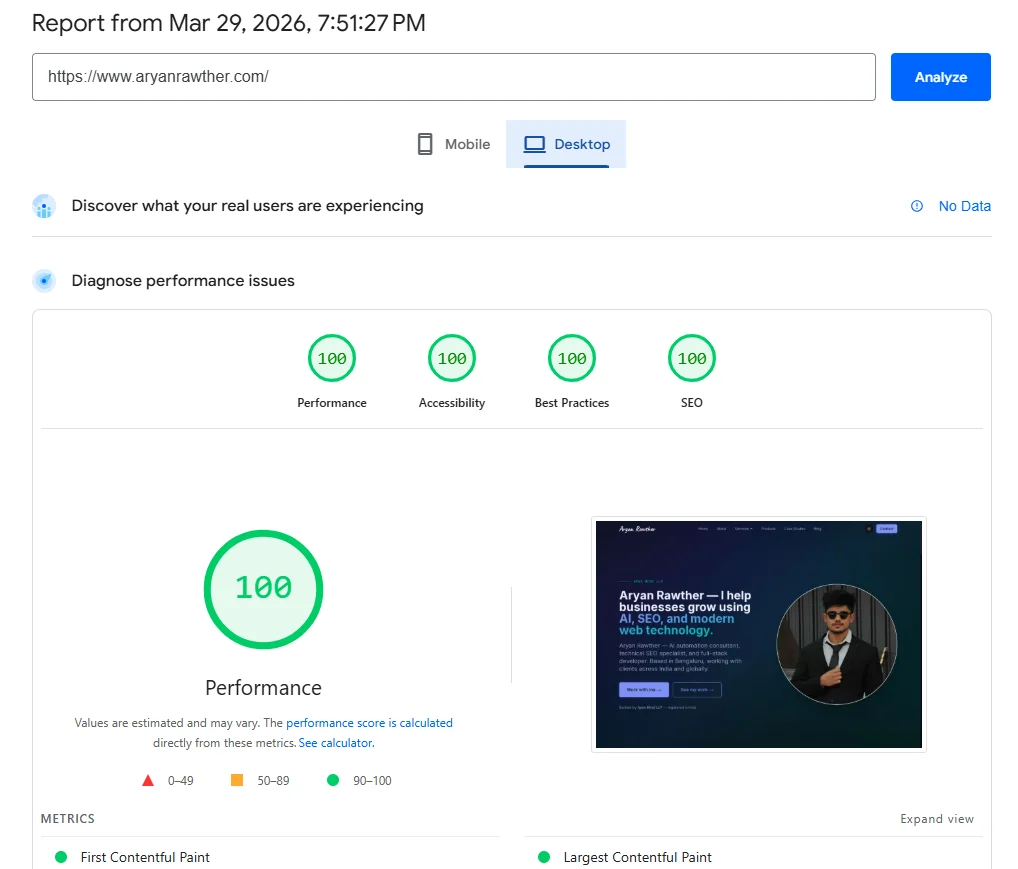
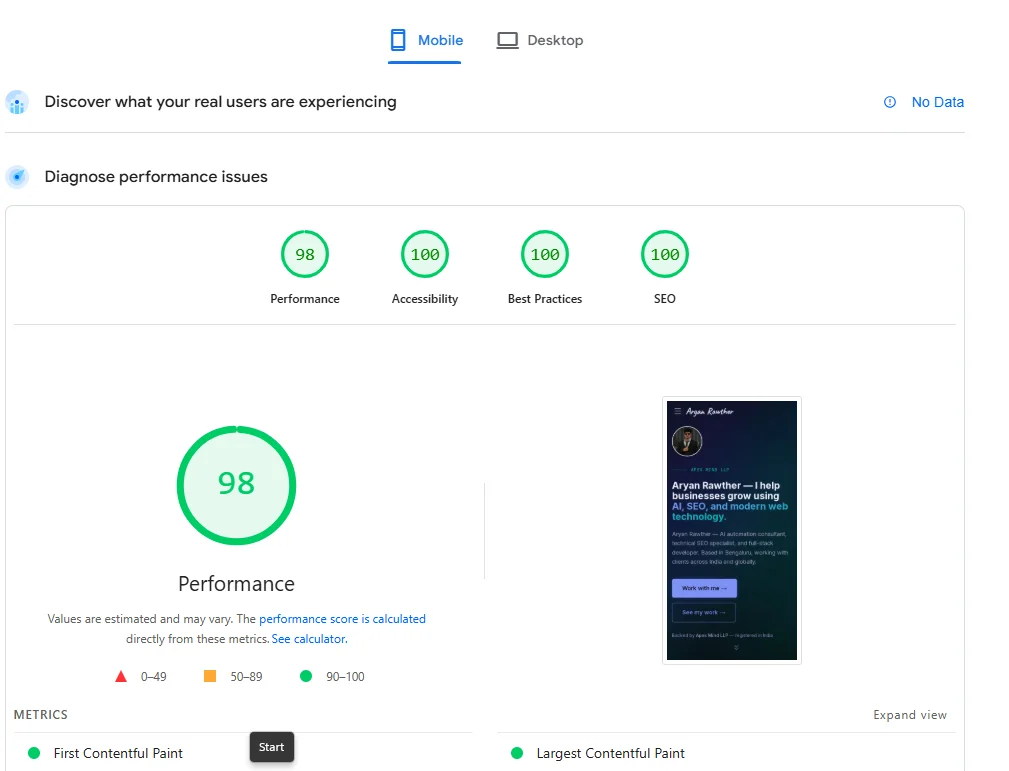
Go to pagespeed.web.dev right now and test your site. If your score is below 90, you have a problem. Here is my site's score — 100 on desktop, 98 on mobile:
Your site should look good AND be fast. If you have to pick one — pick fast. A site that loads in 1.5 seconds with simple animations will outrank a beautiful site that takes 6 seconds to load. Google literally uses page speed as a ranking signal. Their own research shows that 53% of mobile visitors leave a page that takes longer than 3 seconds to load. And Portent found that a site loading in 1 second converts at 2.5x the rate of one loading in 5 seconds.
One more thing — Google uses mobile-first indexingGoogle's approach of using the mobile version of your website as the primary version for crawling, indexing, and ranking., meaning it crawls and ranks the mobile version of your site, not the desktop version. If your mobile experience is broken or slow, your rankings suffer everywhere. Test your site on mobile, not just desktop.
Internal Linking
Here is a tip: the more pages you have covering topics in your domain, the more topical authorityThe practice of establishing your brand as a recognised entity in search engines and AI systems — so they understand who you are, what you do, and when to cite you. search engines give you on that topic. If you are an AI automation consultant with 30 pages covering agents, LLMs, voice AI, specific industries — search engines treat you as an authority.
But those pages need to be internally linkedLinks within your own website that connect one page to another — they help search engines understand your site structure and distribute authority across pages. properly. Blog posts should link to service pages. Service pages should link to case studies. Glossary pages should link to blog posts. Think of it like a web, not a list. If a page has zero internal links pointing to it, search engines might never find it. Tools like Ahrefs Site Audit and Semrush Site Audit can crawl your site and flag orphan pages, broken internal links, and linking gaps you might have missed.
I built 52 glossary pages, 5 industry pages, and 5 resource pages for my site — that is 62 extra pages that all interlink with my core content. More pages, more authority, higher rankings. I even built an AI agent to automate internal linking audits — it saved 20 hours per week of manual work. If you want an example of this in action, look at how I structured the glossary and resources sections of this site.
Backlinks
BacklinksLinks from other websites that point to your website. Search engines treat them as votes of confidence — the more quality backlinks you have, the more trustworthy your site appears. are links from other websites pointing to yours. Search engines treat them like votes of confidence — they build your domain authorityA score (typically 0-100) that predicts how likely a website is to rank in search engine results. Higher authority means stronger rankings.. If reputable sites link to you, you must be worth ranking.
But not all backlinks are equal. A link from a respected industry blog is worth 100 links from random directories. And bad backlinks — from spammy sites, link farms, or completely unrelated domains — can actively hurt your ranking. Google is smart enough to detect paid link schemes.
How to build good backlinks: write useful content people want to reference, guest post on real industry blogs, get listed on relevant directories, create free tools people link to naturally. Check your existing backlinks in Google Search Console → Links. For deeper analysis, tools like Ahrefs and Semrush let you see exactly which domains link to you, which links are toxic, and what your competitors' backlink profiles look like — that competitive insight is something Google Search Console does not give you. If you see suspicious domains, use Google's Disavow Tool.
10 SEO Mistakes That Kill Your Rankings
- Only ranking your website on Google Search Console. Submit your sitemap to Bing Webmaster Tools too. Microsoft Copilot and ChatGPT both use Bing's index. If you are not in Bing's index, you are invisible to these AI platforms. Rank your website on GSC as soon as possible, then immediately do the same on Bing.
- Deploying your website after the product is ready. Search engines take a LOT of time to rank your website — we are talking 3 to 6 months for competitive queries. Ahrefs found that only 1.74% of newly published pages reach the top 10 within one year, and the average #1 ranking page is around 5 years old. I deploy my websites as soon as possible, even if it means delaying my actual product. Deploy a landing page, a blog with a few articles, submit to search consoles, and let it build authority while you build the product. By the time you launch, you already have rankings instead of starting from zero.
- Not having llms.txt and llms-full.txt. Covered above — if you skipped it, go back and set these up.
- Not allowing LLM crawlers in robots.txt. Your robots.txt might be blocking GPTBot, ClaudeBot, or PerplexityBot without you knowing. Check it now.
- Beautiful animations that destroy page speed. If your PageSpeed score is below 90, fix that before building anything else.
- No backlink strategy — or worse, backlinks from spammy domains that are actively hurting your rankings. Check yours in Google Search Console → Links.
- Having pages on your sitemap that do not make sense. Test pages, staging URLs, old campaigns that 404 — all of these tell search engines you do not maintain your site. Audit your sitemap.
- No canonical tagsA tag in your HTML that tells search engines which version of a page is the 'official' one — preventing duplicate content issues when the same page is accessible via multiple URLs.. If your site generates duplicate URLs (like
/pricingand/pricing?ref=navbar), you need canonicals pointing to the preferred version. Without them, search engines split your ranking authority across duplicates. - Not having HTTPS. Google made SSL a ranking signal back in 2014. If your URL starts with
http://instead ofhttps://, you are losing rankings and your browser is showing “Not Secure” to every visitor. Most hosting providers give you free SSL certificates — there is no reason to not have this. - Having ugly or unreadable URLs.
/services/seo-servicesis better than/page?id=47. Most modern frameworks handle this by default, but if you are on WordPress, go to Settings → Permalinks and pick “Post name.” Clean URLs are easier for search engines to parse and for humans to share.
SEO Tips That Helped Me Rank Faster
- Add as many pages as you can on topics you cover. The more content you have in your domain, the more authority you build. Glossary pagesCreating large numbers of SEO-optimised pages at scale using templates and data — glossary pages, location pages, and comparison pages are common examples., resource pages, industry pages, comparison pages — every page is a new entry point for search engines. But make sure they are all internally linked properly. Orphan pages do not help. You can use an LLM agent to generate these pages at scale — I used one to build 52 glossary pages for this site — but be careful: make sure every page actually serves a purpose being on your website, and watch out for a problem I ran into personally. When an AI generates multiple pages, it tends to create internal links to pages it thinksshould exist on your site but actually do not. You end up with dozens of broken links pointing to 404s, which hurts your SEO. Either prompt the agent with your exact sitemap so it only links to real pages, or run a site audit afterwards using Ahrefs, Semrush, or a similar tool to catch and fix those broken links before they get indexed.
- Check your analytics for AI referrers. I use Vercel Analytics since I deploy on Vercel. Look for
chatgpt.com,perplexity.ai,claude.aiin your referrer data. If they are not there, something is off with your AI SEO setup. - Search for yourself on AI platforms. Open ChatGPT or Perplexity, ask questions related to your business. See if you get cited. If not, that tells you where the gap is.
- Use SEO-GEO — it is a free tool I use on every site I work on. It audits your meta tags, schema markup, robots.txt, AI bot access, and evaluates your content against the nine Princeton GEOGenerative Engine Optimisation — the practice of making your content citable by AI search engines like ChatGPT, Perplexity, and Claude. methods. No API keys, no subscriptions. Runs directly in your coding environment. If you want to check if your website has properly done technical SEO for AI search, this is what I personally use.
- Use Ahrefs or Semrush for keyword research and competitor analysis. Google Search Console tells you what you already rank for. Ahrefs and Semrush tell you what you should be ranking for — keywords your competitors rank for that you do not, content gaps in your niche, and how difficult each keyword is to rank. Both have free tiers that cover the basics.
If you want a more detailed checklist, I have a technical SEO audit checklist and a GEO optimisation guide that go deeper into each of these areas.
Real Results — AI Search Traffic After One Week
Here is a real example. SpecLens.ai — a procurement SaaS I built — had decent content but zero AI SEO setup — no llms.txt, no explicit AI crawler rules in robots.txt, and missing schema markup on most pages. Before: zero AI search citations. Not a single visitor from ChatGPT, Perplexity, or Claude.
I ran the SEO-GEO audit, fixed everything it flagged, added llms.txt and llms-full.txt, submitted to both Google Search Console and Bing Webmaster Tools, and added proper structured data to every page. Total time: about 3 hours.
After (one week later):
Google is still the biggest at 52%, but look — ChatGPT is at 11% with 21 visitors, Bing at 12%, Perplexity and Claude also showing up. AI search platforms are already driving a real percentage of traffic. And this is after just one week.
But here is what really stands out: the quality. The emails and enquiries from AI-referred visitors are way more specific, more informed, and convert at a noticeably higher rate than generic Google traffic. When an AI recommends you to someone, it carries a different kind of trust. The person arriving at your site already knows what you do — the AI pre-qualified them.
ℹ️ Want me to run this checklist on your site?
If you are not sure where your site stands on any of this — AI crawler access, schema markup, page speed, internal linking — I can take a look and tell you exactly what to fix. Send me your URL and I will point you in the right direction.
Frequently Asked Questions
I am not technical — can I still do this?
Most of this can be done without writing code. Robots.txt and llms.txt are plain text files. Submitting to search consoles is point-and-click. For schema markup and meta tags, you will need either a developer or a CMS plugin (Yoast for WordPress, for example). The concepts here are platform-agnostic — the implementation details depend on your stack.
My site is brand new — should I focus on SEO or just content first?
Both, but technical SEO comes first. It takes 15 minutes to set up the foundation (robots.txt, sitemap, search console submissions), and then everything you publish after that gets indexed properly from day one. If you publish 20 articles without a sitemap or search console setup, those articles might sit unindexed for weeks.
How do I know if my changes are actually working?
Three signals: check Google Search Console for increasing “indexed pages” count (weekly for 90 days), check your analytics for AI referrers showing up (chatgpt.com, perplexity.ai, claude.ai), and search for yourself on AI platforms to see if you get cited. If all three are trending up, it is working.
Related Pages
- SEO Services — Technical SEO, content strategy, and GEO optimisation for organic growth and AI visibility.
- Case Study: AI SEO Agent — How I automated 400-page internal linking audits with a LangGraph agent.
- Case Study: CombineHealth SEO — From 25% PageSpeed to 1M daily impressions via technical SEO and GEO.
- AI Automation Consulting — Design and deploy AI agent workflows and process automation for your business.
What to Do Next
- Run through the TL;DR checklist at the top — check off what you already have.
- Fix the gaps. Most sites are missing llms.txt, AI crawler rules, and proper schema markup.
- Submit your sitemap to both Google Search Console and Bing Webmaster Tools if you have not already.
- Check back in 2-4 weeks — look for AI referrers in your analytics.
If you want me to take a look at your site and tell you what is missing, send me your URL here. I will tell you exactly what to fix.
I post more guides like this on LinkedIn — follow me there if you want to stay updated.

Aryan Rawther
Founder of Apex Mind LLP — AI automation consultant, SEO specialist, and full-stack developer based in Bengaluru, India.
Need help with your website's SEO or AI search visibility?
Send me your URL and I'll tell you exactly what to fix.
Get in touch →